Picture a request that sounds small. A sales team wants three things to happen when someone approves an order in a model-driven app:
- Stop the approval if the order takes the customer over their credit limit.
- If the order is large, get Finance to sign it off and tell the account manager in Teams.
- Send the approved order to the ERP system, which sits behind the corporate network.
You could build all three in Power Automate, or all three in Logic Apps. A developer could write the whole thing as a Dataverse plug-in. Each version would work in a demo, and each would hurt somewhere different in production.
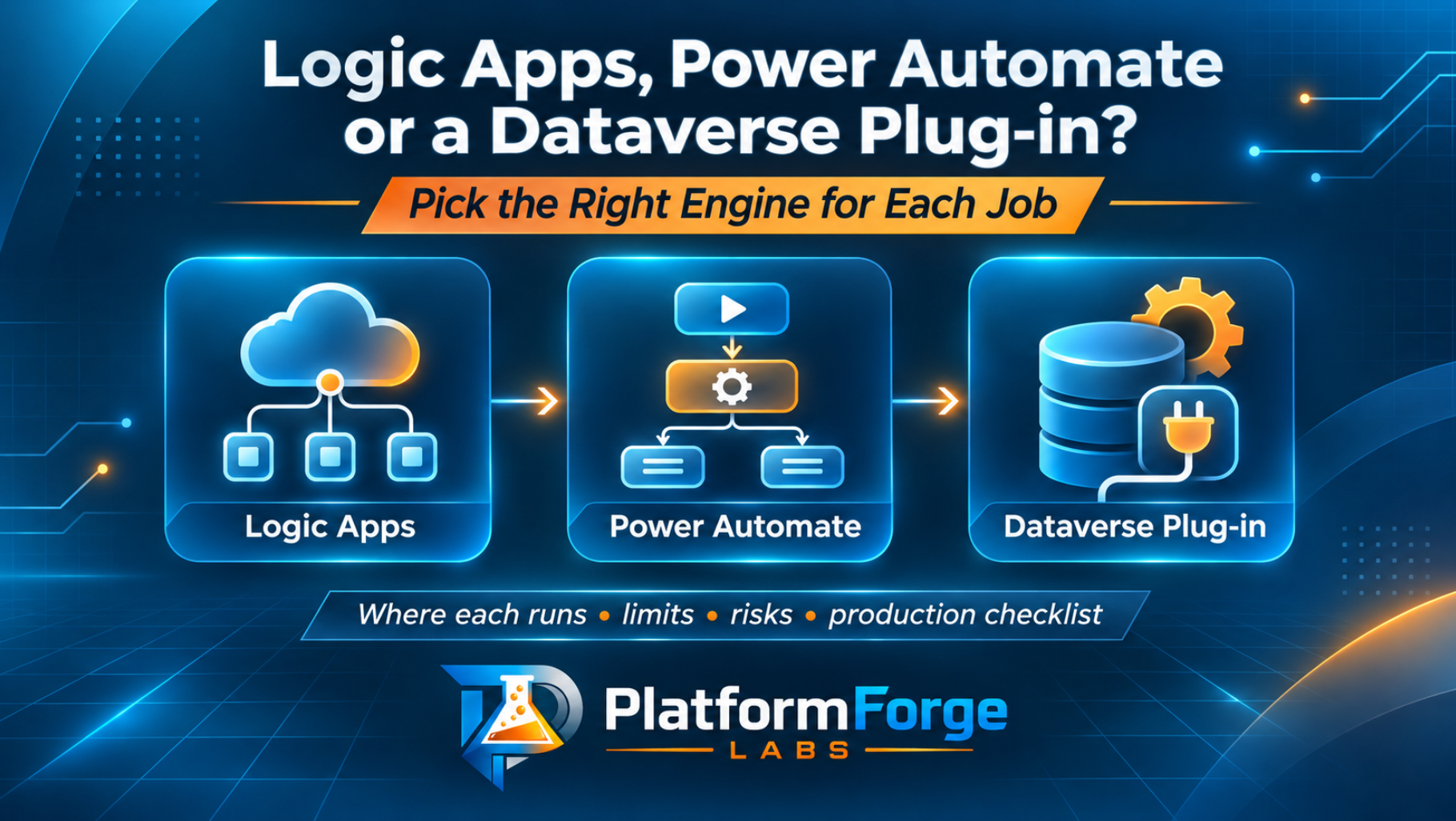
The better answer is usually to split the requirement across all three. To do that well, you need to know where each engine runs, what it’s good at, and which limits and risks show up once real users and real volumes arrive.
The short version
- Use a Dataverse plug-in when the logic must stop or change the save itself. It runs inside the Dataverse transaction, so it can block bad data before anyone sees it. Keep it fast.
- Use Power Automate for business processes that people own and change: approvals, notifications, Microsoft 365 work and lighter integrations. Makers can build and adjust it without a release pipeline.
- Use Azure Logic Apps for integration that needs to be engineered and operated like a service: private networking, managed identity, Git-based releases, high volume and long-running orchestration.
Where each one runs, and why that matters most
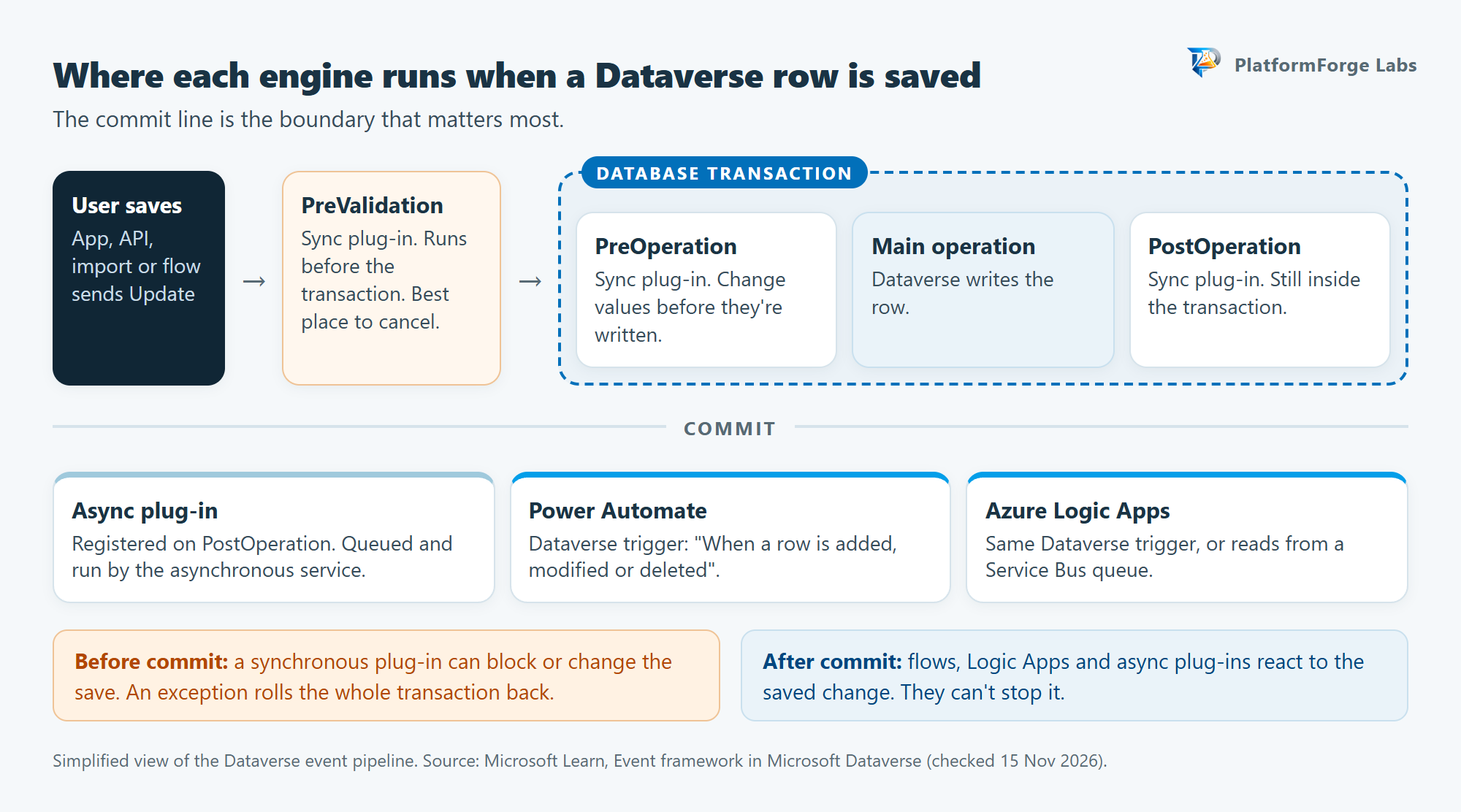
Start with one question: when does the logic run, relative to the save?
A plug-in is a .NET class registered on a step in the Dataverse event pipeline. Pick the message (Create, Update and so on), the table and the stage:
- PreValidation runs before the database transaction starts and before security checks. It’s the place to cancel an operation.
- PreOperation runs inside the transaction. Change values on the record here.
- PostOperation runs inside the transaction after the main operation. You can also register asynchronous steps here, and those run later, outside the transaction.
If a synchronous plug-in throws an exception inside the transaction, the whole transaction rolls back. Your code can guarantee that bad data never lands, and a bug in it can make every save fail.
Power Automate and Logic Apps both react to Dataverse through the When a row is added, modified or deleted trigger. That trigger fires after the change is saved. A flow or Logic App can tidy up afterwards, call other systems or start a process, but it can’t stop the save that triggered it.
Ignoring this leads to a familiar mess. A team builds a “validation” flow, the flow runs after the record is already committed, and now they need a second flow to undo the first one’s damage.
Dataverse plug-ins
Where they shine
- Enforcing rules no matter how data arrives. A plug-in on the Update message runs whether the change came from a model-driven app, a canvas app, an import, the Web API or another flow.
- Speed. Microsoft describes a well-written plug-in as the most performant way to apply custom business logic in Dataverse.
- Transactional integrity. Validation and dependent updates succeed or fail together.
- Values on the way in. PreOperation lets you set or correct columns before the row is written, without a second update.
Limits you’ll hit
- Two minutes, hard stop. A Dataverse message operation, including its registered plug-ins, must complete within 2 minutes or it’s cancelled and rolled back. Microsoft’s guidance goes further: keep a plug-in under 2 seconds, and go asynchronous if it needs longer.
- Developer skills and tooling. You’re writing C# against the Dataverse SDK, building a .NET Framework assembly and registering it with the Plug-in Registration tool, Power Platform Tools for Visual Studio or
pac plugin. - No parallel threads, no stored state. The platform caches plug-in instances, so classes must be stateless. Multi-threading inside plug-ins isn’t supported.
- Loop protection. Every time a plug-in triggers another operation that fires another plug-in, the execution depth goes up. By default, Dataverse treats a depth of 8 within an hour as an infinite loop and aborts. Don’t build business logic on that number.
Risks to plan for
- A slow plug-in slows everyone. Synchronous code runs while the user waits. Too many synchronous steps on one message, or one slow query, shows up as a sluggish form for every user.
- Calling external systems synchronously. If your plug-in calls an API during the save, that API’s uptime and latency become part of your save. Set explicit timeouts, and move anything slow or unreliable to an asynchronous step or a queue.
- Update storms. Without filtering attributes, an Update step fires on every update to the table. With them, it fires whenever a listed column is in the request, even if the value didn’t change. Leave the primary key out.
- Low-code plug-ins are still preview. Power Fx low-code plug-ins look like a friendly middle ground, but they’re a preview feature and Microsoft says previews aren’t meant for production. Instant low-code plug-ins have been deprioritised in favour of Dataverse functions, which are also in preview.
Example: block an approval over the credit limit
This plug-in is registered on Update of a custom pf_order table, at PreValidation, synchronous, with pf_status as the only filtering attribute. A pre-image called pre holds pf_totalamount and pf_customer, because an Update request only carries the columns that changed.
using System;
using Microsoft.Xrm.Sdk;
using Microsoft.Xrm.Sdk.Query;

public class BlockOrderOverCreditLimit : IPlugin
{
    // pf_status choice value for "Approved"
    private const int ApprovedStatus = 100000002;

    public void Execute(IServiceProvider serviceProvider)
    {
        var context = (IPluginExecutionContext)
            serviceProvider.GetService(typeof(IPluginExecutionContext));
        var tracing = (ITracingService)
            serviceProvider.GetService(typeof(ITracingService));
        var factory = (IOrganizationServiceFactory)
            serviceProvider.GetService(typeof(IOrganizationServiceFactory));
        var service = factory.CreateOrganizationService(context.UserId);

        if (!context.InputParameters.Contains("Target")
            || !(context.InputParameters["Target"] is Entity target))
            return;

        var status = target.GetAttributeValue<OptionSetValue>("pf_status");
        if (status == null || status.Value != ApprovedStatus)
            return; // only act when the order is being approved

        // Update requests only carry changed columns,
        // so read the rest from the pre-image.
        var pre = context.PreEntityImages.Contains("pre")
            ? context.PreEntityImages["pre"]
            : null;
        var amount = Read<Money>(target, pre, "pf_totalamount");
        var customer = Read<EntityReference>(target, pre, "pf_customer");
        if (amount == null || customer == null)
            return;

        var account = service.Retrieve(
            "account", customer.Id, new ColumnSet("creditlimit"));
        var limit = account.GetAttributeValue<Money>("creditlimit");
        tracing.Trace("Order {0}: amount {1}, credit limit {2}",
            target.Id, amount.Value, limit?.Value);

        if (limit != null && amount.Value > limit.Value)
        {
            throw new InvalidPluginExecutionException(
                $"This order ({amount.Value:N2}) is over the customer's " +
                $"credit limit ({limit.Value:N2}). " +
                "Ask Finance to review the limit before approving.");
        }
    }

    // Prefer the value in the request; fall back to the pre-image.
    private static T Read<T>(Entity target, Entity pre, string column)
        where T : class
    {
        return target.GetAttributeValue<T>(column)
            ?? pre?.GetAttributeValue<T>(column);
    }
}
The user sees the message, the status change never saves, and nothing downstream fires. It’s deliberately simple. A real credit check would include open orders and currency, and the table and column names are illustrative.
Power Automate cloud flows
Where it shines
- People in the loop. Approvals, Teams messages, Outlook, SharePoint and Planner are all a few clicks away.
- The business can own it. Power Automate is built for business users and citizen developers. A process owner can change a threshold or a recipient without waiting for a release.
- Connectors. More than 1,400 of them, many shared with Logic Apps, with most of the Microsoft 365 work already wrapped up.
- Long waits for humans. A run can last up to 30 days, which covers most approval chains.
Limits you’ll hit
- Run duration and history: 30 days for both. Pending approvals time out at day 30.
- Synchronous HTTP calls time out after 120 seconds. Longer work needs an asynchronous pattern.
- Action limits per day depend on the flow’s performance profile, which comes from its owner’s licence. During the current transition period, Microsoft quotes approximate daily figures of 10,000 Power Platform requests for Low, 200,000 for Medium and 500,000 for High. Every action counts, including variables, compose steps, retries and failed actions. For flows under user licences, the transition period ends in a phased rollout starting April 2027.
- Loops are slow by default. Apply to each runs one item at a time unless you raise concurrency (up to 50).
- Dataverse is a Premium connector. Check licensing before you build, not after.
Risks to plan for
- The owner leaves. A flow runs on its owner’s plan. If the original owner leaves the organisation, the flow drops to the Low performance profile, and connections tied to that person can stop working. For anything that matters, build the flow in a solution, use connection references and move ownership to a service principal application user. Premium flows owned by a service principal need a Process or per-flow licence, a flow group, or a designated licensed user.
- Flows switch themselves off. A flow that fails continuously for 14 days is turned off. A flow with no trigger activity for 90 days might be turned off unless its owner has a premium or Process licence.
- Trigger noise. Several updates to the same row can start several runs even if the values didn’t change. Use Select columns and Filter rows on the Dataverse trigger. Leave out lookup columns (they aren’t supported there) and the primary key (it’s in every update).
- Self-triggering loops. A flow that updates the same row it triggers on can start itself again. Filter on the column that changed, or write a marker the trigger can ignore.
- Policy changes at runtime. If an admin changes a data policy (DLP) and your flow now breaks it, the flow is suspended. Enforcement usually lands within an hour, and can take up to 24.
Azure Logic Apps
Where it shines
- Engineering-grade integration. Logic Apps is aimed at professional integrators and developers. It supports Git, CI/CD, ARM or Bicep, and (for Standard) local development and debugging in Visual Studio Code.
- Networking and identity. Standard logic apps support virtual network integration, private endpoints and managed identities. Your workflow can call an internal system over a private network as a known identity, with no firewall hole opened for a shared connector.
- Ownership by resource, not by person. Access is managed with Azure role-based access control on the resource, so the workflow doesn’t go missing when its creator moves on.
- Long-running and high-volume work. Stateful runs can last 90 days by default. Standard gives you dedicated compute and built-in connectors (Service Bus, SQL Server, Event Hubs and others) that run in-process for better throughput.
- Two hosting models. Consumption is multitenant, one workflow per resource and pay-per-execution. Standard is single-tenant, hosts many workflows per app and is priced on a hosting plan.
Limits you’ll hit
- HTTP timeouts: 120 seconds on Consumption and 225 seconds by default on Standard. Use the asynchronous polling pattern for longer work.
- Stateless workflows run in memory, usually finish within 5 minutes and aren’t restored after an outage. You choose stateful or stateless when you create the workflow, and changing it later causes runtime errors.
- Retries: the default retry policy is 4 attempts. Plan for idempotency on the receiving end.
- Azure skills and an Azure subscription. Someone needs to own resource groups, monitoring, networking and cost.
Risks to plan for
- Copied environments fire production workflows. The Dataverse trigger works through webhook registrations stored in Dataverse (
callbackregistrations). If you copy a Dataverse environment, those registrations are copied too, so your test copy can start notifying the same Logic Apps workflows. Check for them, and delete them, after every environment copy. - Duplicate trigger registrations on Standard. After a restart or instance reallocation, a Standard workflow with a Dataverse trigger can create a duplicate callback registration, and the duplicate has to be found and deleted by hand.
- Runaway cost from a broken trigger. A misconfigured Service Bus or storage trigger on Standard (for example, one without permission to the queue) can cause unnecessary scaling and a surprise bill. Monitor triggers from day one.
- Two admin planes. Power Platform admins see Dataverse; Azure admins see the Logic App. Agree who gets paged before go-live.
Side by side
| Dataverse plug-in | Power Automate | Azure Logic Apps | |
|---|---|---|---|
| Runs | Inside the Dataverse event pipeline | Power Platform, after the change is saved | Azure (multitenant or single-tenant), after the change is saved |
| Can stop the save? | Yes (synchronous steps) | No | No |
| Time limit | 2 minutes per message operation; aim for under 2 seconds | 30-day run | 90-day run (stateful default) |
| Sync HTTP timeout | You set it in code | 120 seconds | 120 s Consumption; 225 s Standard default |
| Built by | Developers (C#, .NET Framework) | Makers and business technologists | Integration developers |
| Ownership | Solution components in Dataverse | A user or service principal | Azure resource with RBAC |
| ALM | Solutions; assembly versioning | Solutions, connection references, environment variables | Git, CI/CD, ARM/Bicep, deployment slots |
| Networking | Runs in the Dataverse sandbox | Connectors and on-premises data gateway | VNet integration and private endpoints (Standard) |
| Pricing model | Part of the Dataverse platform | Per-user or per-flow (Process) licensing | Pay-per-execution or hosting plan |
| Biggest risk | Slow or failing code blocks every save | Owner-bound flows and silent switch-offs | Operational sprawl and environment-copy webhooks |
Back to the order: one requirement, three engines
The original request splits cleanly once you give each piece to the engine that’s best at it.
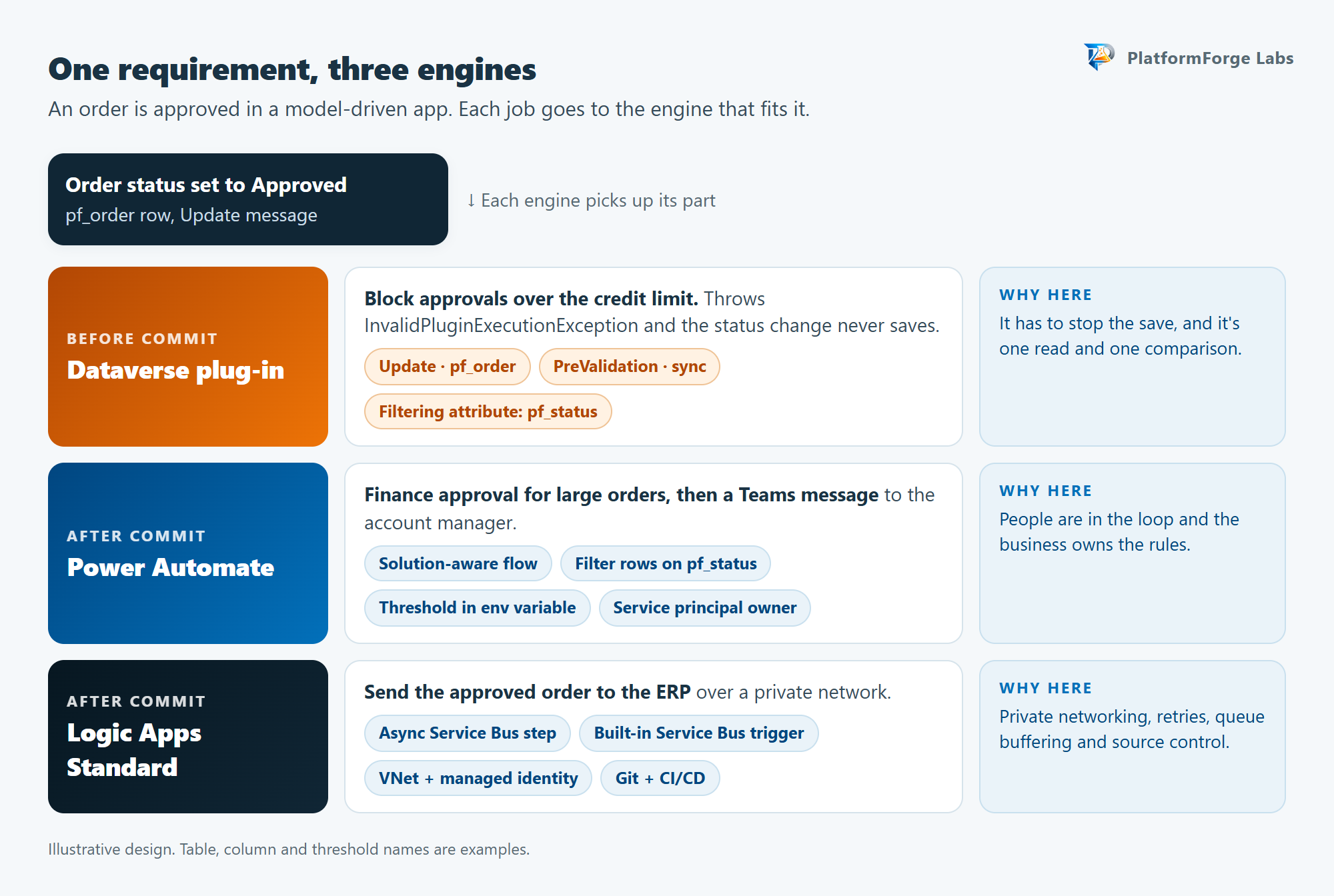
1. Credit check: plug-in. The rule has to stop the save, so it lives in PreValidation. It reads one record and makes one comparison, so it stays well under the 2-second guideline.
2. Finance approval and Teams message: Power Automate. Build a solution-aware flow on the Dataverse trigger with Change type set to Modified, Select columns set to pf_status and Filter rows set to pf_status eq 100000002, so it only wakes up for approvals. Add a Condition that compares the order total with an environment variable holding the approval threshold, start the approval when it’s over, then post to Teams. The threshold belongs to the business, and an environment variable lets the process owner change it per environment without editing the flow. Move ownership to a service principal and license it properly before go-live.
3. ERP sync: Logic Apps Standard. The ERP sits behind the corporate network and the integration team wants source control, retries and run history they can query. A Standard workflow with VNet integration and a managed identity handles that. For higher volumes, or if you want a buffer between Dataverse and the ERP, register an asynchronous Azure Service Bus step on the order table and let the Logic App read from the queue with the built-in Service Bus trigger. If the ERP is down for an hour, the messages wait instead of failing.
Doing it all in one tool goes wrong in predictable ways:
- All plug-in: the ERP call would sit inside the user’s save, tied to the ERP’s uptime and to the 2-minute limit. The Finance approval can’t happen inside a transaction at all.
- All Power Automate: the credit check runs after the order is already approved, and the ERP call goes through a gateway on a user-licensed flow with daily action limits.
- All Logic Apps: same credit-check problem, plus the approval and Teams steps now need a developer every time Finance changes the threshold.
A production checklist
Run through this before any of the three goes live.
Plug-ins
- Filtering attributes set, and no primary key in the list.
- Pre-images limited to the columns the code needs.
- External calls have explicit timeouts, or have moved to an async step or queue.
ITracingServiceused, and trace logging enabled in non-production environments.- Assembly and steps live in one solution.
Power Automate
- Built inside a solution with connection references and environment variables.
- Owned by a service principal application user, with the right licence.
- Trigger uses Select columns and Filter rows.
- Errors handled with scopes and run-after settings, and someone gets the failure notifications.
- Run history and daily action usage checked during testing.
Logic Apps
- Stateful or stateless chosen on purpose.
- Managed identity in place of stored secrets.
- Deployed through a pipeline from source control.
- Alerts set on failed runs and trigger errors.
- Callback registrations checked after every Dataverse environment copy.
How to decide in five questions
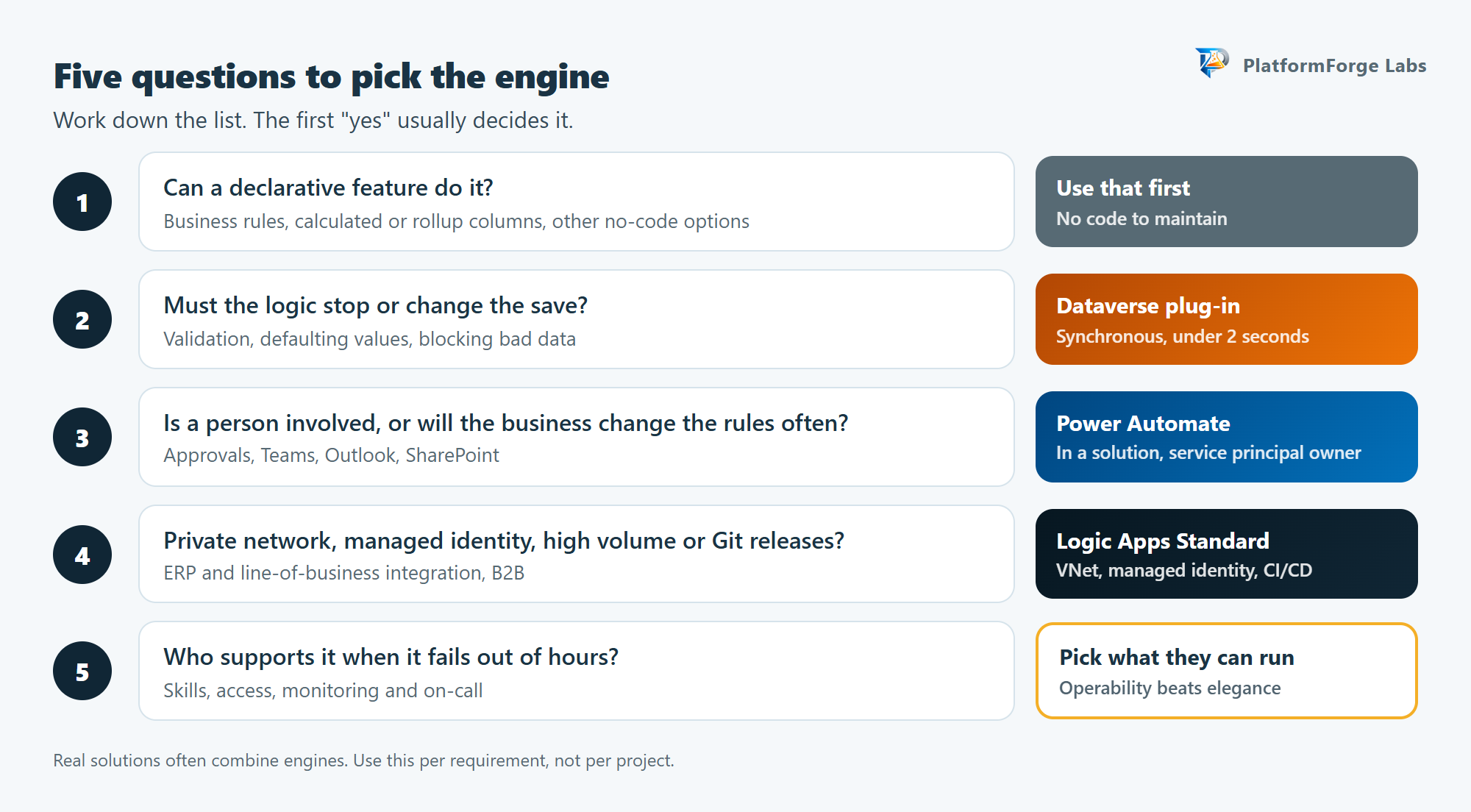
- Can a declarative feature do it? Start with business rules, calculated or rollup columns and other no-code options. Write a plug-in only when they can’t do the job.
- Must the logic stop or change the save? Use a synchronous plug-in, and keep it small.
- Is a person involved, or will the business change the rules often? Use Power Automate inside a solution.
- Does it cross a private network, need managed identity, run at high volume, or need Git-based releases? Use Logic Apps Standard.
- Who supports it when it fails out of hours? Pick the tool your support team can operate and troubleshoot, even if another one looks more elegant on a diagram.
You don’t have to pick only one. A flow can call a Logic Apps workflow, and a Logic App can call Azure Functions. Match each requirement to when it must run and who will own it, and the choice usually becomes obvious.
Related PlatformForge Labs reading
- Dataverse Custom APIs as MCP tools for business operations covers transactions, execution identity and when a Custom API beats a flow.
- Power Automate resilience and recovery cheat sheet
- Power Platform licensing changes for 2027
- Logic Apps vs Power Automate vs Dataverse plug-ins cheat sheet, the one-page companion to this article.
Sources consulted
Checked 15 November 2026.
- Event framework in Microsoft Dataverse
- Use plug-ins to extend business processes
- Write a plug-in
- Register a plug-in
- Analyze plug-in performance
- Best practices for plug-in and workflow development
- IExecutionContext.Depth property
- Service protection API limits
- Low-code plug-ins (preview)
- Limits of automated, scheduled and instant flows
- Trigger flows when a row is added, modified or deleted
- Support for service principal owned flows
- Overview of solution-aware flows
- Data policies
- Microsoft Dataverse connector reference
- Differences between Standard and Consumption logic apps
- Limits and configuration for Azure Logic Apps
- Power Automate migration to Azure Logic Apps (Standard)
- Connect workflows to Microsoft Dataverse
- Integration and automation platform options in Azure